The 'password you never set' prompt isn't a bug — it's pg_hba.conf doing exactly what you told it
The moment it happens
You just installed PostgreSQL. You followed the getting-started guide, or maybe you didn't — maybe you just ran brew install postgresql or apt install postgresql and typed psql to see what would happen. And what happens is this:
$ psql -U postgres
Password for user postgres:
You stare at it. What password? You never set one. You didn't even know there was a password to set. So you try hitting Enter a few times, and you get:
psql: error: connection to server on socket "/var/run/postgresql/.s.PGSQL.5432" failed:
FATAL:  password authentication failed for user "postgres"
Or maybe you're trying to connect as your regular OS user and you get hit with a completely different error that doesn't even ask for a password:
$ psql
psql: error: connection to server on socket "/tmp/.s.PGSQL.5432" failed:
FATAL:  Peer authentication failed for user "alice"
No password prompt. No opportunity to type anything. Just a flat denial. This scenario happens to almost everyone setting up PostgreSQL for the first time. The default assumption is that the installation is broken or that the package manager set an unknown, random administrative password. You reboot the machine, reinstall Postgres, maybe uninstall and try a different package manager — and it keeps happening. I've watched this exact sequence play out on Slack and Stack Overflow so many times I can recite it from memory. If you prefer watching me walk through the fix in three minutes instead of reading two thousand words, I recorded a video covering exactly this scenario — but if you're the type who wants to understand why so it never trips you up again, read on. The whole thing takes thirty seconds to fix once you know where to look.
Three ways Postgres decides who you are
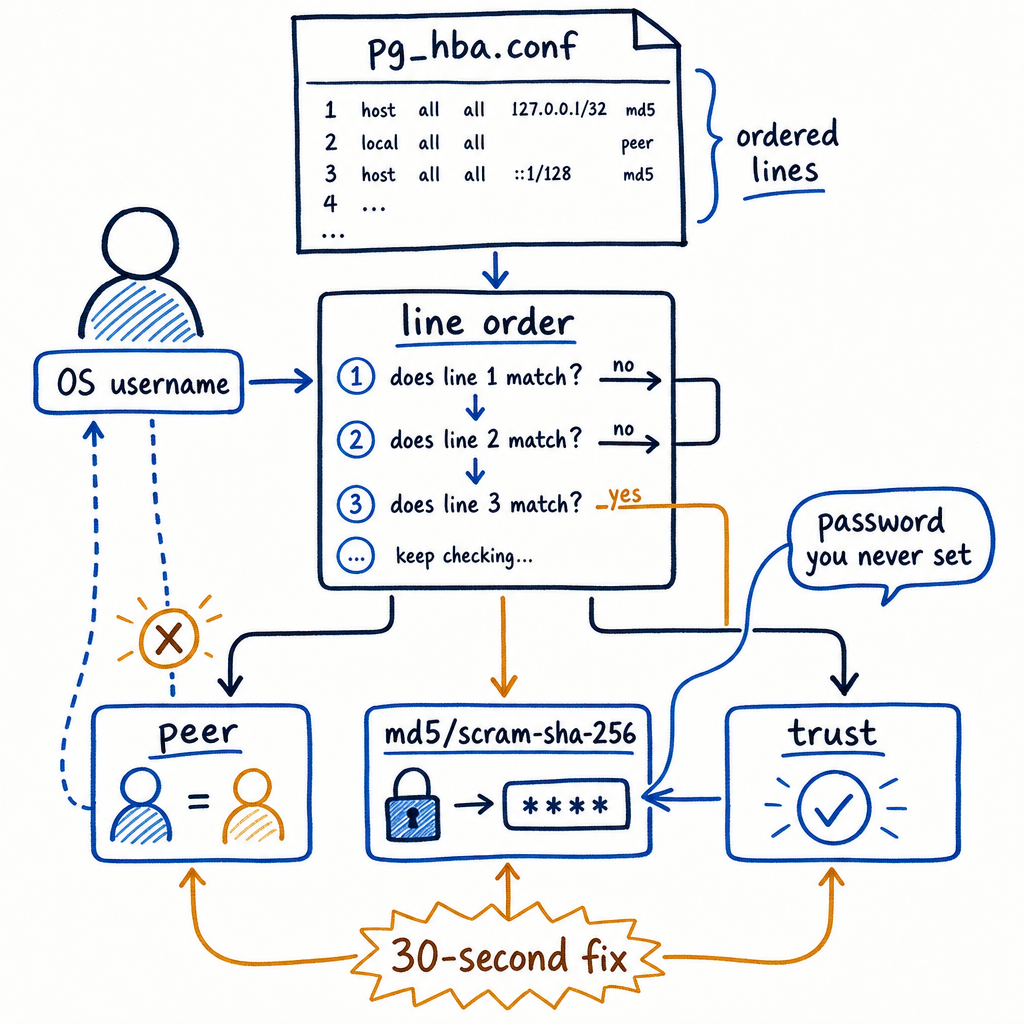
Before we touch a config file, you need to understand what the server is actually checking when you knock on the door. PostgreSQL has a surprisingly long menu of authentication methods, but three of them cause probably 95% of all new-user confusion: peer, md5, and scram-sha-256. There's also trust, which I'll explain because you'll see it in default configs and Docker images, and then I'll tell you why you should almost never use it.
| Method | What it checks | Connection type | Has a password? | Typical use case |
|---|---|---|---|---|
| peer | OS username must exactly match the PostgreSQL role name | Unix-domain socket only (no -h flag) |
No password needed, ever | Local dev on a single-user machine |
| md5 | Hashed password stored in pg_authid |
Any (socket or TCP) | Yes — prompts every time | Legacy compatibility; don't use for new installs |
| scram-sha-256 | Salted challenge-response using SHA-256 | Any (socket or TCP) | Yes — prompts every time | Current recommendation for password-based auth |
| trust | Absolutely nothing | Any | No password, no OS check | Throwaway containers only; catastrophic anywhere else |
Peer is simple and elegant on a single-user development machine: you log into your OS as alice, you type psql, and the Postgres server asks the kernel "who is on the other end of this socket?" The kernel says "alice," and Postgres says "fine, you're role alice now." No password. No prompt. It just works — if the role exists and if the pg_hba.conf says to use peer on that socket.
Md5 is the old password method. It sends a double-hashed MD5 challenge. It's been deprecated since PostgreSQL 14 because MD5 is cryptographically broken, but you'll still see it in distro packages that haven't updated their default configs. If your server asks for a password and you've got md5 in place, the prompt is real and your role needs a password set.
Scram-sha-256 is the modern replacement. It never sends the actual password over the wire, it salts properly, and it's what PostgreSQL uses if your password_encryption setting is scram-sha-256 (the default since PG 14). If you're setting passwords today, this is what you want them stored as.
Trust means "anyone who can reach this port is whoever they claim to be." That's catastrophic if a port is exposed to a network, and I've seen production databases get ransomwared this way. Docker's official Postgres image defaults to trust for local connections inside the container, and that's fine only because the container is a sealed, single-process environment where nobody else can reach the socket. If you're not in a container, do not use trust. Even on a "safe" local box — peer or scram-sha-256 only.
pg_hba.conf: the rulebook nobody reads until it bites them
Every connection that hits a PostgreSQL server gets matched against a file called pg_hba.conf. "HBA" stands for host-based authentication. The server reads this file line by line, top to bottom, and the first line that matches wins. There is no fallthrough. There is no "more specific rule overrides less specific." First match. Done. That single sentence is the answer to about half the confused questions I see.
To find your pg_hba.conf, run this from any psql session (or use the full file path if you know where your data directory is):
SHOW hba_file;
That will output something like /etc/postgresql/16/main/pg_hba.conf on Debian/Ubuntu, or /usr/local/var/postgres/pg_hba.conf on macOS Homebrew. Open it. Here's what a fresh initdb on many Linux distros drops in (I'm pulling this from an Ubuntu 22.04 install, but the pattern is universal):
# TYPE  DATABASE        USER            ADDRESS                 METHOD
local   all             postgres                                peer
local   all             all                                     peer
host    all             all             127.0.0.1/32            scram-sha-256
host    all             all             ::1/128                 scram-sha-256
Let's annotate every column of that first line so you never have to guess again:
- TYPE:
localmeans a Unix-domain socket connection — no TCP involved, no network stack, just a file on disk like/tmp/.s.PGSQL.5432. - DATABASE:
allmeans this rule applies to any database name requested. - USER:
postgresmeans this rule only fires when the connecting user claims to be thepostgresrole. - ADDRESS: blank for
locallines because there's no IP address on a socket. - METHOD:
peermeans "ask the kernel for the OS username and check it against the requested PostgreSQL role name; no password prompt."
So that first line says: if you connect via local socket claiming to be the postgres role, use peer auth. That's why psql -U postgres works out of the box on a fresh install — the postgres system user exists, the postgres database role exists, and they match.
The second line says: any other user on a local socket also uses peer. So if you're logged into your OS as alice and type psql, it tries to connect as database role alice and the kernel confirms you are OS user alice. Match. No password.
The third and fourth lines say: any TCP connection to localhost (127.0.0.1 or ::1) uses scram-sha-256 password authentication. That means if you type psql -h localhost, you're hitting a host line, not a local line, and you will get a password prompt whether you set one or not.
The critical thing here is first-match-wins. If I reorder this file and put the host line above the local line, nothing changes because connection type is part of the match — a socket connection won't match a host line. But if I have two local lines with different methods, the first one wins. This is where people get bitten.
Why peer breaks: the OS-user-to-role mismatch
Here's the scenario I've debugged dozens of times. User alice installs Postgres on her Ubuntu laptop using apt. The installation creates a system user called postgres and a database role called postgres. Alice logs into her laptop as, well, alice. She opens a terminal and types:
$ psql
And gets:
psql: error: connection to server on socket "/var/run/postgresql/.s.PGSQL.5432" failed:
FATAL:  Peer authentication failed for user "alice"
No password prompt at all. She's confused because she is alice, and the error even says user "alice", so why is it failing?
Here's what Postgres just did, step by step:
psqlwith no-Uflag defaults to the current OS username as the database role. That'salice.- The connection is a Unix-domain socket (no
-hflag), so it matches thelocallines in pg_hba.conf. - The first matching
localline usespeerauthentication. - The peer method asks the kernel: "what OS user is on the other end of this socket?" Kernel says:
alice. - Postgres checks: is there a database role named
alice? No. The only role that exists ispostgres. Authentication fails. - Postgres returns the error and closes the connection. Since peer failed, it never prompts for a password — peer doesn't have a password prompt. The failure is immediate and silent to the user in terms of interaction.
Now contrast that with what happens if Alice types:
$ psql -U postgres
Same socket connection, but now the requested database role is postgres. The kernel says the OS user is still alice. Peer checks: does alice match postgres? No. Same error? Actually, on many default configs, yes — because the first local line that matches is local all postgres peer, and alice ≠ postgres, so peer fails. But wait — alice shouldn't be hitting that line if she requests role postgres? She should, because the USER column says postgres and she's requesting postgres. The match is on the requested database role, not the OS user. Peer then verifies the OS user against the requested role, and they don't match.
This is the other half of the confusion: peer always compares OS user to requested database role. If they don't match, it fails. It doesn't fall through to the next line. That's the first-match-wins behavior — once a line matches on type/database/user/address, the auth method on that line runs and succeeds or fails. If it fails, the connection is rejected. Period.
Two fixes, pick one
You've got two clean ways out of this, and which one you pick depends on what you're trying to do.
Fix 1: Use the postgres system user for the initial connection
This is the one-line answer I type into Slack most often. Don't fight the default config — use it. The postgres system user already exists, and peer will work for it:
$ sudo -u postgres psql
That runs psql as the OS user postgres, connects via local socket, matches the local all postgres peer line, peer verifies postgres = postgres, and you're in. No password. Once inside, you can create whatever roles you need:
CREATE ROLE alice WITH LOGIN;
GRANT ALL PRIVILEGES ON DATABASE mydb TO alice;
Now alice exists as a database role. If you exit and run psql as OS user alice, the peer line local all all peer will match, peer will check alice = alice, and you're in with no password — but only for alice. If you need superuser on alice, add SUPERUSER to the CREATE ROLE statement:
CREATE ROLE alice WITH LOGIN SUPERUSER;
Be careful with that on anything that isn't a disposable dev machine.
Fix 2: Edit pg_hba.conf to change the auth method for your user
If you'd rather use password auth on local sockets for a specific user, or if you want scram-sha-256 across the board, edit pg_hba.conf and add a line above the peer lines:
# TYPE  DATABASE        USER            ADDRESS                 METHOD
local   all             alice                                   scram-sha-256
local   all             postgres                                peer
local   all             all                                     peer
Then set a password for alice inside psql:
ALTER ROLE alice WITH PASSWORD 'newpassword';
Then reload:
$ pg_ctl reload
Or from inside psql:
SELECT pg_reload_conf();
Now when OS user alice runs psql on a local socket, the first local line matches alice, uses scram-sha-256, and prompts for the password you just set. The postgres user still uses peer below it.
Gotcha with Fix 2: If you leave the old peer lines below your new line, they'll never fire for alice because the scram-sha-256 line matches first. That's correct behavior — just be aware that reordering matters. I've seen people add a new line at the bottom of the file, which means the existing peer line at the top matches first and the new line is dead code. Always put more specific rules above general ones.
Local socket vs TCP: the other half of the puzzle
Every psql command that doesn't include -h connects via a Unix-domain socket. On Linux that's typically /var/run/postgresql/.s.PGSQL.5432 or /tmp/.s.PGSQL.5432. On macOS Homebrew it's /tmp/.s.PGSQL.5432. These socket connections match only local lines in pg_hba.conf.
psql -h localhost goes through TCP port 5432 on the loopback interface. That matches host lines. Different pg_hba.conf rules. Different auth methods in every default config I've ever seen.
Test this yourself. With the default pg_hba.conf I showed earlier:
$ psql # local socket, matches 'local all all peer', no password
$ psql -h localhost # TCP, matches 'host all all 127.0.0.1/32 scram-sha-256', password prompt
If you want to know exactly which line matched for a connection, bump up the log level temporarily:
SET log_connections = on;
Or set it in postgresql.conf and reload. Then check your PostgreSQL log file (location varies — SHOW log_directory; inside psql). You'll see lines like:
LOG:  connection received: host=127.0.0.1 port=5432
LOG:  connection authenticated: user="postgres" method=scram-sha-256
That method= field tells you exactly which pg_hba.conf line won.
Setting or resetting a password once you're in
Once you've gotten into psql using peer (via sudo -u postgres psql or your own matched OS user), setting a password is one statement:
ALTER ROLE alice WITH PASSWORD 'newpassword';
That's it. The password is stored hashed according to the password_encryption setting in postgresql.conf. Since PostgreSQL 14, the default is scram-sha-256. To verify what your cluster is using:
SHOW password_encryption;
If it says md5 and you're on PG 14 or later, change it:
# In postgresql.conf
password_encryption = scram-sha-256
Then reload (pg_ctl reload or SELECT pg_reload_conf()), and reset the password so it gets rehashed:
ALTER ROLE alice WITH PASSWORD 'samepassword';
Now the stored hash is SCRAM-SHA-256 instead of MD5.
Edge cases and gotchas
Multiple pg_hba.conf entries conflicting: If you have two local lines for the same user with different methods, the first one wins. If the first line is trust and the second is scram-sha-256, you'll never see a password prompt for that user — trust lets them straight through. I've seen production servers where someone added local all all trust at the top for debugging and forgot to remove it. Every local connection was unauthenticated for months.
Docker containers using trust by default: The official Postgres Docker image sets trust for local connections inside the container because there's no other OS user inside that container to match peer against, and nobody else can reach that socket. This is fine as long as you don't forward port 5432 to a network where untrusted clients can reach it. If you're mapping the port with -p 5432:5432, you need host lines in pg_hba.conf with scram-sha-256, and you need to set a password on the postgres role. The Docker image's default host lines often use trust or md5 — check them before exposing anything.
macOS Homebrew vs Linux apt/yum defaults: Homebrew's default pg_hba.conf often uses trust for local connections rather than peer. The behavior is similar — you won't get a password prompt but with trust, there's no OS user check at all, so anyone who can access the socket can connect as any role without a password. On macOS, peer authentication isn't supported because the OS lacks the necessary getpeereid() system call, so Homebrew packages often default to trust for local connections. That means the security for socket connections is even lower — anyone on the machine can walk right in. If that's a problem, you can switch those local lines to scram-sha-256 and set passwords, but be aware you'll lose the passwordless convenience.
The one thing to remember
The prompt for a password you never set is a rite of passage, not a broken install. PostgreSQL's default authentication rules are explicit and predictable, but they aren't intuitive until you read pg_hba.conf. Once you understand that peer checks your OS identity and scram-sha-256 checks a password, the whole thing collapses into a simple decision tree: if you're on the same machine and want passwordless access, match the OS user to the database role and use peer; if you need a password or you're connecting from a remote host, use scram-sha-256 and set the password. That thirty-second fix — sudo -u postgres psql — works everywhere, and now you know exactly why. No reinstall, no panic, just a config file that's finally doing what you told it.