"No pg_hba.conf Entry for Host": What the Error Actually Means and How to Fix It
If Postgres just handed you FATAL: no pg_hba.conf entry for host "10.0.2.15", user "app", database "orders", SSL off, here's the short version: your connection reached the server, but no line in pg_hba.conf matched the client address, database, user, and encryption state together. Fix the rule that's supposed to cover this exact combination, reload, and reconnect. The rest of this article covers every variant of that fix — Docker, replication, CIDR mistakes, and the auth-method mismatch that mimics this error.
📖 Read the full guide: Fix "no pg_hba.conf entry for host" (Full Cause Map)
▶ Watch the video walkthrough: FATAL: no pg_hba.conf entry for host — The Complete Fix Map
https://www.youtube.com/watch?v=CD5RzhtZagI
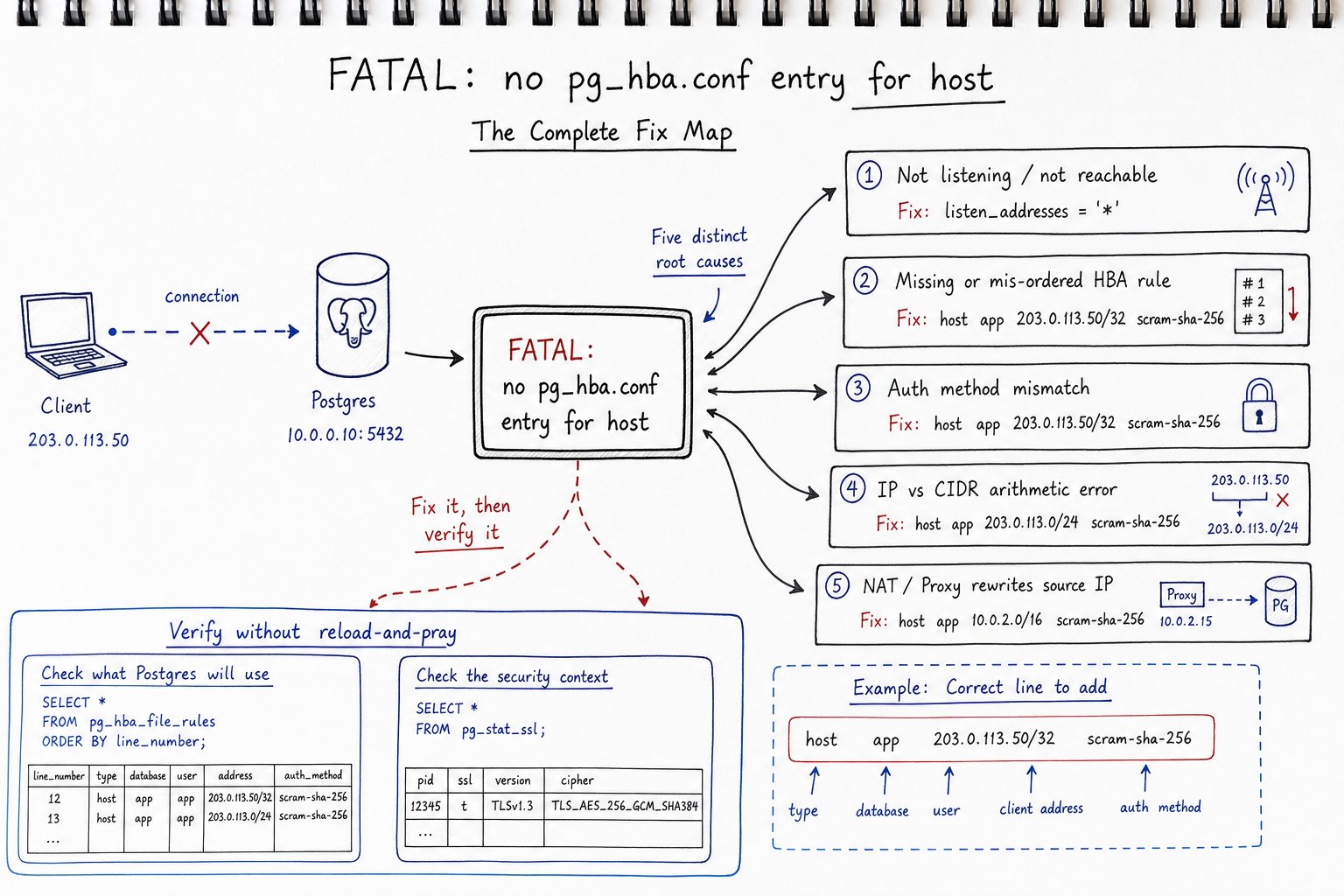
On PostgreSQL 16+ you'll see no encryption instead of SSL off. Same message, different wording.
That one line already tells you four things before you touch a config file:
- Client address Postgres actually saw —
10.0.2.15, not whatever IP you assume your app server has. - Role —
app, exactly as sent in the startup packet. - Database —
orders. - Encryption state — SSL off, which immediately implicates or clears every
hostsslline in your file.
That narrows five possible causes down to two or three before you open anything.
Connection Refused vs. No pg_hba Entry: Know Which One You Have
About half the people searching this error don't have an HBA problem at all — they have a network problem and are about to waste an hour editing a file that was never wrong.
| What you see | What it means | What it rules out |
|---|---|---|
could not connect to server: Connection refused |
Nothing is listening on that IP:port, or a firewall sent a RST | Not an HBA issue — Postgres never evaluated any rule |
| Connection hangs, then times out | Packets are being dropped silently: security group, iptables, wrong route | Not an HBA issue |
no route to host |
Layer 3 routing problem | Not an HBA issue |
FATAL: no pg_hba.conf entry for host ... |
You reached the postmaster, it read your startup packet, walked pg_hba.conf, found no matching record | Network path, port, and Postgres process are all fine |
FATAL: password authentication failed for user "app" |
A record did match — you failed the auth challenge it specified | Your HBA rule exists and matched; this is a credentials problem |
If you got no pg_hba.conf entry, the TCP connection landed. Your firewall and listen_addresses are fine for that interface. Stop running tcpdump and go look at the file.
How Postgres Evaluates a Connection Request
- The postmaster listens on whatever
listen_addressesandunix_socket_directoriesproduced at startup. - A connection arrives; the postmaster forks a backend.
- The backend reads the startup packet — user, database, and whether SSL was negotiated.
- It walks pg_hba.conf from the top.
- The first record matching connection type, database, user, and client address wins. There's no fall-through.
- That record's auth method is the only one tried.
Two consequences trip people up constantly:
- First match wins, even if a later line would allow you. If line 40 rejects and line 92 would accept, line 92 is dead code for that client.
- A matched rule that fails auth produces a different error.
password authentication failedmeans your HBA file already did its job — the problem is credentials, not CIDRs.
Cause 1: Postgres Isn't Listening Where You Think
This rarely produces the "no pg_hba.conf entry" message directly — it usually produces connection refused or a hang, because the connection never reaches HBA evaluation. Check it anyway, since a pooler or load balancer can turn a listen problem into something that looks like an access-control failure further down the stack.
SHOW listen_addresses;
ss -lntp | grep 5432
*binds all interfaces, IPv4 and IPv6.0.0.0.0binds IPv4 only — an IPv6 client gets nothing.::binds IPv6, and on many kernels IPv4-mapped addresses too, but that's not consistent across distros.localhostor empty string disables remote TCP entirely.
listen_addresses is a postmaster-level setting — pg_reload_conf() won't apply it, you need a restart. That's the most common reason a fix "didn't take."
Cause 2: No Matching Rule at All
The plain missing line. A host record has five fields:
# TYPE   DATABASE   USER   ADDRESS          METHOD
host     orders     app    10.0.2.0/24      scram-sha-256
Common patterns:
# App tier subnet
host    orders    app    10.0.2.0/24    scram-sha-256

# One app server, encrypted only
hostssl orders    app    10.0.2.15/32   scram-sha-256

# Replica — note 'replication', not 'all'
host    replication    replicator    10.0.2.31/32    scram-sha-256
Find the file that's actually loaded:
SHOW hba_file;
SHOW config_file;
Debian/Ubuntu packages typically resolve to /etc/postgresql/17/main/pg_hba.conf; RHEL packages and source builds usually keep it in the data directory. A stale file left behind from a previous install can eat twenty minutes — SHOW hba_file settles it instantly.
Apply changes with a reload, not a restart:
SELECT pg_reload_conf();
Then verify without guessing:
SELECT line_number, type, database, user_name, address, netmask, auth_method, error
FROM pg_hba_file_rules
ORDER BY line_number;
Any non-null error means that row failed to parse. On PostgreSQL 15+, pg_hba_file_rules re-parses the on-disk file, so it shows you exactly what would load before you reload — check it every time you edit the file.
Cause 3: A Rule Matched, but the Wrong One
You added a correct-looking line and it still fails. Now you're in first-match-wins territory.
A broad reject sitting above your line:
host    all    all    0.0.0.0/0    reject          # line 84
host    orders app    10.0.2.0/24  scram-sha-256   # line 91, never reached
all doesn't cover replication. The all keyword explicitly excludes replication connections — your replica needs its own line with replication in the database column.
A role-specific line shadowed by an earlier one. If line 30 rejects role app from a wide range, and line 55 grants +app_team on a narrower one, app never reaches line 55.
Turn on the diagnostic:
ALTER SYSTEM SET log_connections = on;
SELECT pg_reload_conf();
log_connections logs the auth method used on every successful connection — useful for confirming which rule actually matched. Turn it off afterward; it's chatty on busy systems.
Cause 4: CIDR Arithmetic and the SSL Split
If the error shows 10.0.2.15 and your rule says 10.0.1.0/24, those are different networks, period.
| Address field | Covers | Use when |
|---|---|---|
10.0.2.15/32 |
Exactly that host | Single app server |
10.0.2.0/24 |
10.0.2.0–10.0.2.255 | One subnet |
10.0.0.0/16 |
10.0.0.0–10.0.255.255 | A whole tier, sparingly |
0.0.0.0/0 |
Everything IPv4 | Almost never |
samehost |
Server's own IPs | Local admin tooling over TCP |
samenet |
Any directly connected subnet | Small flat networks |
127.0.0.1/32 |
IPv4 loopback only | Not enough on dual-stack hosts |
::1/128 |
IPv6 loopback only | Add alongside the IPv4 line |
The loopback split catches people constantly: a client resolves localhost to ::1, connects over IPv6, and hits a file with only 127.0.0.1/32. Always ship both lines.
Also note: psql with no -h uses the Unix socket, matched by local records — not host records. psql -U app orders and psql -h localhost -U app orders are two different connection types hitting two different sections of your file.
hostssl, hostnossl, host
Connection type keywords: local (Unix socket), host (TCP, encrypted or not), hostssl (TCP, SSL only), hostnossl (TCP, no SSL), plus hostgssenc/hostnogssenc for GSSAPI.
This is where the "SSL off" field in the pg_hba.conf entry for host error stops being decoration: if every rule that could match your client is hostssl, a plaintext client matches nothing and gets exactly this error, with no fallback. Fix it by making the client connect with sslmode=require, or by adding a host/hostnossl rule — the former is the better long-term fix.
hostssl also requires ssl = on in postgresql.conf. If SSL is off, those rules can never match, and Postgres flags it at load time — check the error column in pg_hba_file_rules.
Cause 5: Docker, Kubernetes, NAT, and Poolers Rewrite the Source Address
Trust the IP printed in the error over the IP you believe your client has.
Traffic crossing Docker's default bridge gets MASQUERADEd — Postgres sees the bridge gateway (often something in 172.17.0.0/16), never your laptop's real address. This is the classic pg_hba.conf Docker connection refused / no-entry combo: psql run inside the container hits the Unix socket or 127.0.0.1 and proves nothing about external access; run from outside, it arrives from the bridge gateway and needs its own rule, e.g. host all all 172.17.0.0/16 scram-sha-256 for dev, tighter in production.
Kubernetes shows a pod CIDR or node address depending on the path. PgBouncer and HAProxy make every backend connection appear to originate from the proxy host — a per-client-IP policy behind a pooler is fiction.
One more Docker-specific trap: in the official postgres image, POSTGRES_HOST_AUTH_METHOD only affects the pg_hba.conf generated at initialization. If the data directory already exists on a mounted volume, setting that variable does nothing — initdb never reruns. Start from a fresh volume, or edit the file in place and reload.
The Auth-Method Mismatch That Looks Like an HBA Problem
Since PostgreSQL 14, the default password_encryption is scram-sha-256; before that, it was md5. On an upgraded server, your pg_hba.conf might request scram-sha-256 while a role's stored verifier is still MD5 — that role's login will fail because the formats don't match.
Check it:
SELECT rolname, left(rolpassword, 4) AS verifier
FROM pg_authid
ORDER BY rolname;
SCRAM means scram-sha-256; md5 means the old format. Changing password_encryption doesn't re-encrypt existing passwords — it only affects passwords set afterward:
ALTER ROLE app PASSWORD 'the-same-or-new-password';
The distinction matters for diagnosis: a scram-sha-256 vs md5 pg_hba mismatch produces password authentication failed, not no pg_hba.conf entry for host. If you're seeing the latter, you don't have an auth-method problem yet — you have a missing or shadowed rule. Fix that first.
A 60-Second Diagnostic Runbook
# 1. Read the error precisely — address, user, database, SSL state
tail -n 50 /var/log/postgresql/postgresql-17-main.log | grep pg_hba

# 2. Confirm the postmaster is reachable (it is, if you got the HBA error)
ss -lntp | grep 5432
-- 3. Find the real files
SHOW hba_file;
SHOW config_file;
SHOW listen_addresses;

-- 4. Look for parse errors and read the effective order
SELECT line_number, type, database, user_name, address, auth_method, error
FROM pg_hba_file_rules
ORDER BY line_number;
# 5. Add or reorder the line, using the address from the error message
sudo -u postgres vi /etc/postgresql/17/main/pg_hba.conf
-- 6. Reload and re-verify
SELECT pg_reload_conf();
SELECT line_number, address, auth_method, error FROM pg_hba_file_rules WHERE error IS NOT NULL;
# 7. Test from the real client host, not the DB server
PGPASSWORD='...' psql "host=10.0.2.7 port=5432 dbname=orders user=app sslmode=require" -c 'select 1'
If You've Locked Yourself Out
Get console or SSH access as the OS user that owns the data directory (usually postgres), then add a temporary line at the top of pg_hba.conf:
local all postgres trust
Reload with pg_ctl reload -D /path/to/data, connect over the Unix socket with psql -U postgres, fix the real rules, remove the temporary line, and reload again.
Rules Worth Deploying in Production
- Never pair
0.0.0.0/0withtrust. There's no dev-only excuse — dev boxes get scanned too, and exceptions have a way of surviving into production. - Prefer
hostssl+scram-sha-256+ per-role, per-database lines over broadall allrules. - Comment every rule with a ticket number and date — nobody remembers why a /16 is in there six months later.
- Put an explicit
rejectfor0.0.0.0/0and::/0at the bottom for audit clarity, even though Postgres denies by default. - From PostgreSQL 16 onward, use
include_dirso teams add files instead of editing a shared one, and take advantage of regex matching in the database/user columns for tenant-per-database setups. - Validate in CI: load the candidate file on a throwaway instance and fail the build if
SELECT count(*) FROM pg_hba_file_rules WHERE error IS NOT NULLis greater than zero.
Catching This Before It Locks Anyone Out
Query pg_hba_file_rules on a schedule and alert on any non-null error, on trust paired with a wide CIDR, or on the on-disk file drifting from what's currently loaded (detectable on PG 15+) — that drift almost always means someone edited the file and forgot to reload, which passes every manual test today and fails at the next restart. Correlating spikes of no pg_hba.conf entry errors against recent deploys usually points straight to a missing line for a new host or subnet.
If you'd rather not wire that up yourself, MyDBA runs this class of check on a schedule alongside the rest of your config drift surface.
Either way, the principle holds: this error is cheap to diagnose once you accept what it's telling you. The client reached your server. The address in the message is the one that matters. Everything else is reading five columns in order and remembering that the first match wins.