Zero Downtime Postgres Major Upgrade: Replacing pg_upgrade with Logical Replication
Let's talk about Postgres major upgrades. If you search for solutions, the standard recommendation is almost always pg_upgrade with the --link flag. It is fast, but it is also a binary choice. Once you run it, your old cluster is modified, and your new cluster is live. If something goes wrong ten minutes after you hand the system back to users, your rollback plan is restoring from a backup. For databases holding terabytes of data, that means hours of unexpected downtime.
▶ Watch the video walkthrough: Zero-Downtime Postgres Major Upgrades with Logical Replication
https://www.youtube.com/watch?v=nvmx84OZgXo
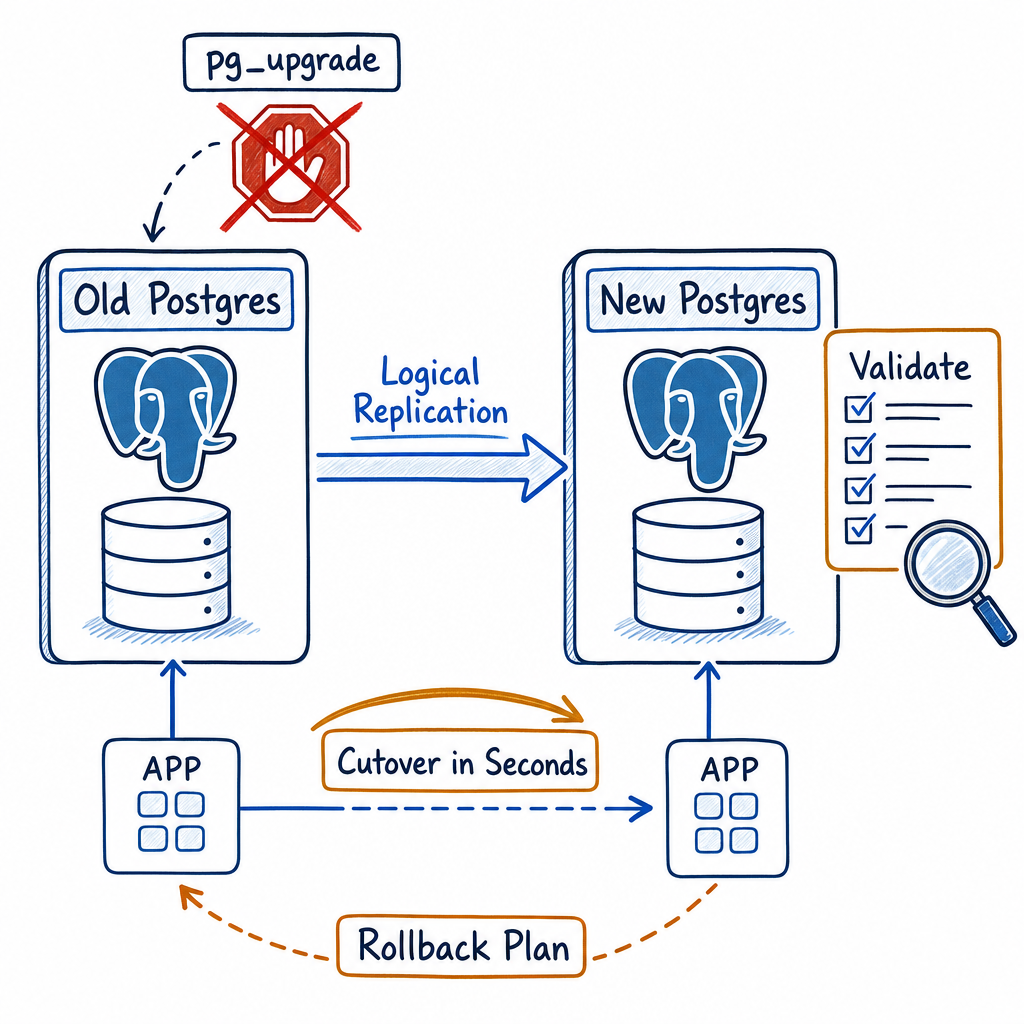
That is why we use logical replication instead. This approach trades setup complexity for a gradual, controlled cutover. It lets you run both clusters side-by-side, verify the data, and flip the switch with a simple connection string change—and an instant rollback that spares you from restoring terabytes of backup.
In this guide, I’ll walk you through the entire process: setting up logical replication between major Postgres versions, verifying replication integrity, performing a controlled cutover, and keeping a safety net in place so you can sleep through the night after the upgrade.
Why Logical Replication Beats pg_upgrade for Zero‑Downtime Work
pg_upgrade --link is undeniably fast—it hard‑links files and can upgrade a terabyte cluster in minutes. The problem is that it’s a one‑way street. Once the new cluster starts, the old data directory is linked in place and you can’t easily go back. If an application‑level misbehaviour surfaces 45 minutes later, you’re stuck. Logical replication, on the other hand, lets you run the old and new clusters side‑by‑side. You can:
- Validate that every schema object has been replicated correctly.
- Compare row‑counts and checksums between the old and new databases.
- Test your application against the new version using a read‑only connection first.
- Switch production traffic with a single connection string change, then instantly revert if something looks wrong.
That flexibility is what makes it a true zero‑downtime upgrade strategy.
Prerequisites and Preparation
Before you start, make sure you meet these requirements:
- Postgres version: Logical replication has been available since version 10. For a major upgrade, both the old (publisher) and new (subscriber) clusters must be 10 or later.
- Replica identity: Every table you replicate needs a primary key or a
REPLICA IDENTITY FULL. Without it,UPDATEandDELETEoperations can’t be replicated correctly. - Network connectivity: The subscriber must be able to reach the publisher on the usual port (5432 or whatever you’ve configured).
- WAL level: The publisher’s
wal_levelmust be set tological. This requires a restart, so it’s often best to enable it ahead of time.
Step 1: Spin Up the New (Target Version) Cluster
Provision a fresh Postgres instance running the major version you want to upgrade to. You can do this on a separate host, or on the same machine using a different data directory and port — it doesn’t matter, as long as the subscriber can reach the publisher.
Make sure the new cluster’s configuration includes sensible defaults for memory, checkpoint tuning, and disk layout. You want it ready for production before the cutover.
Step 2: Prepare the Publisher (Old Cluster)
On the existing production cluster, ensure wal_level = logical and restart if necessary. Then, create a publication that includes all the tables you need to migrate:
CREATE PUBLICATION upgrade_pub FOR ALL TABLES;
If you prefer more control, list specific tables. Avoid publishing temporary or unlogged objects — they won’t replicate anyway.
Create a dedicated replication user:
CREATE ROLE repluser WITH REPLICATION LOGIN PASSWORD 'strongpassword';
Grant appropriate permissions so that the role can read all published tables and create replication slots:
GRANT SELECT ON ALL TABLES IN SCHEMA public TO repluser;
ALTER PUBLICATION upgrade_pub OWNER TO repluser;
Step 3: Set Up the Subscriber (New Cluster)
On the new cluster, create the same schema objects. The easiest way is to take a schema‑only dump from the old cluster and load it:
pg_dump --schema-only --no-owner old_db | psql new_db
This ensures tables, indexes, functions, and extensions are present before you start replicating data.
Now, on the new cluster, create a subscription that points back to the publisher:
CREATE SUBSCRIPTION upgrade_sub
CONNECTION 'host=old_host dbname=old_db user=repluser password=strongpassword'
PUBLICATION upgrade_pub;
As soon as the subscription is created, logical replication will start copying the initial snapshot of each table. Data will then be streamed in near real‑time.
Step 4: Validate and Monitor
Once the initial sync completes, confirm that the two clusters are in step:
-- On the publisher
SELECT count(*) FROM important_table;
-- On the subscriber
SELECT count(*) FROM important_table;
You can also use built‑in monitoring views:
- On the publisher:
SELECT * FROM pg_stat_replication; - On the subscriber:
SELECT * FROM pg_stat_subscription;
Let this run for a few hours under typical load. Check that replication lag stays close to zero. If you spot anomalies, investigate before moving forward.
Step 5: The Cutover — Switching Traffic with Zero Downtime
This is where the strategy shines. Because both clusters are fully operational, you can perform the switch in a brief window (seconds) without taking the system down.
- Stop application writes to the old database — either by pausing your application or by putting the old database into read‑only mode. A simple way:
ALTER DATABASE old_db SET default_transaction_read_only TO on;(new transactions will block writes). - Wait for replication to catch up — run the monitoring query on the subscriber until the lag is zero.
- Update your application’s connection string to point to the new cluster. If you’re using a DNS alias or a service‑discovery endpoint, just update the record; otherwise, restart your app with the new config.
- Test that everything works by validating a few critical flows. Keep the old cluster up but read‑only for a while.
Because you haven’t harmed the old cluster, rollback is just reverting the connection string — no data loss, no restore pain.
Rollback Without Tears
If trouble arises after the switch, you can go back in under a minute:
- Set the old cluster back to read‑write:
ALTER DATABASE old_db RESET default_transaction_read_only; - Point your app back to the old cluster’s connection string.
- If writes occurred on the new cluster that you need to keep, you’ll have to reconcile them manually, but in a panic scenario you can simply discard the new cluster’s changes and resume on the old one — the old database is untouched.
Once you’re confident in the new version, decommission the old cluster and reclaim resources. You can drop the subscription and publication without affecting anything else.
Watching Out for Pitfalls
Few things are ever completely smooth. Here are the common gotchas:
- DDL changes: Logical replication does not replicate
CREATE TABLEorALTER TABLE. If you need to make schema changes during the migration, apply them to both sides. - Large objects and sequences: By default, logical replication handles base table data and sequences. Large objects (lo) are not replicated; you’ll need to handle them separately.
- Super‑large initial sync: The snapshot copy can be I/O‑intensive. Schedule it during a low‑traffic period and monitor disk usage.
Wrapping It Up
Adopting logical replication for a major Postgres upgrade transforms a high‑stakes event into a planned, low‑anxiety operation. You gain side‑by‑side verification, a rollback strategy that doesn’t involve mounting backups, and the ability to cut over at a time you control — all without bringing your application down for more than a few seconds. It takes more upfront setup than pg_upgrade, but for databases that run your business, the trade‑off is overwhelmingly worthwhile. Give it a try in a staging environment, build your runbook, and you’ll wonder why you ever did it any other way.