Postgres vs Redis, Mongo, RabbitMQ: The Real Decision Framework
I’ve consolidated stacks under a deadline with production on fire. I’ve also ripped Postgres back out six months later and put Redis back where it belonged — on its own instance, doing a single job. No hedging. There’s a sweet spot where a single Postgres database genuinely replaces three specialized systems plus your message broker, and I’ll show you the exact SQL, the exact break‑points, and the scars from when it went wrong.
The whiteboard video Postgres vs Redis vs Mongo vs RabbitMQ: When to consolidate? gives the visual walkthrough. This article goes deeper: exact DDL, queries, tuning knobs, and a framework with actual numbers so you can decide before you bet your pager on it. We’ll get into the internals — transaction isolation, vacuum mechanics, GIN posting lists — so you know not just what happens, but why the floor eventually gives way.
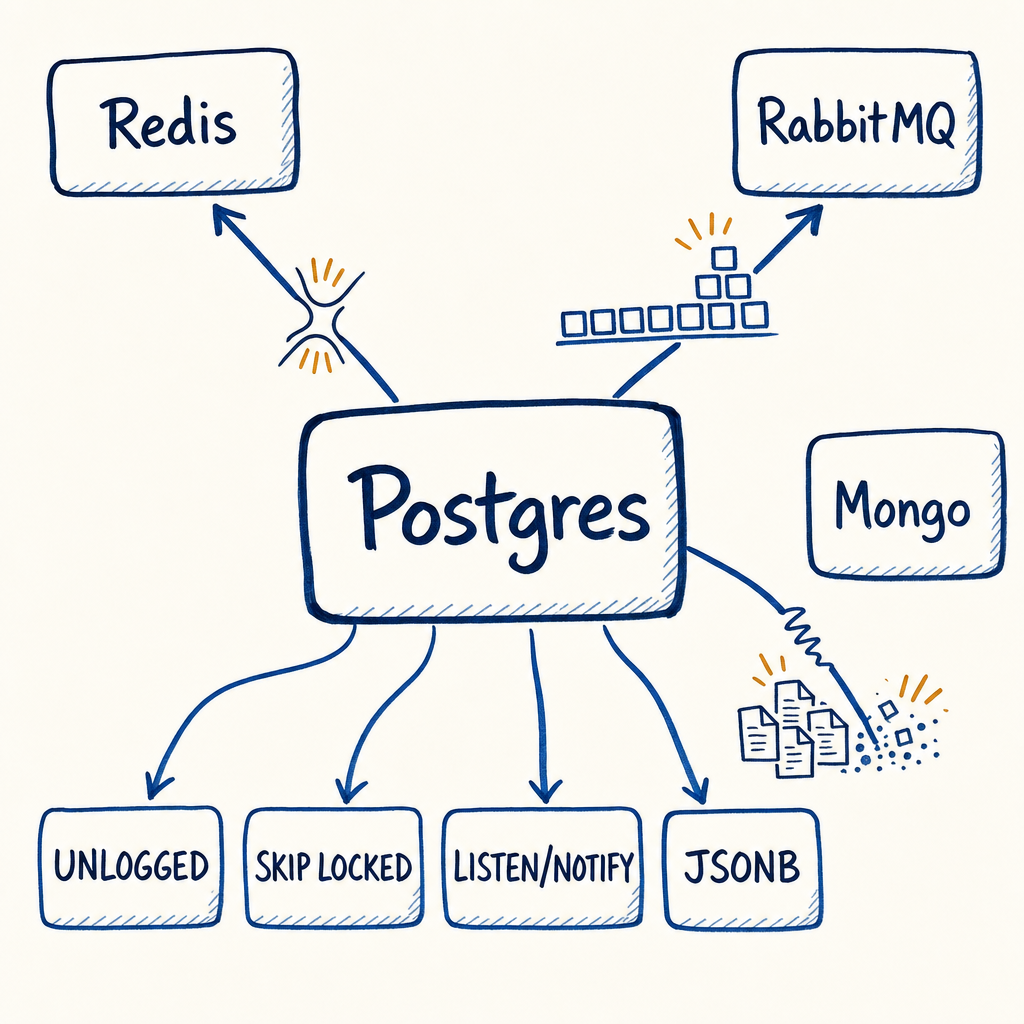
The four‑system tax
The cost isn’t just dollars. It’s operational surface area. Four systems mean four sets of credentials to rotate, four different patching schedules, four different DR sync mechanisms, and a wider blast radius when one of them browns out. For a team of under eight engineers, that surface area means every production incident starts with “which component?” before you even get to “why.” By collapsing cache, queue, pub/sub, and document storage into one database you’re not just saving licenses — you’re reducing the diagnosis surface. The trade, of course, is that you’re concentrating load and risk. The rest of this article is about knowing exactly where that concentration will crack.
The decision framework, with actual numbers
Before you move a single table, run your workload through this filter. If you can’t answer “yes” to the first three tests, consolidation on Postgres will likely hurt more than it helps.
| Ceiling | Threshold | Postgres can handle it if… |
|---|---|---|
| Throughput | ~10,000 req/s comfortably on modern hardware with PgBouncer pooling; past 500 raw concurrent sessions, connection handling bottlenecks, so PgBouncer is mandatory | your total workload (OLTP + cache reads + queue jobs + pub/sub) fits under that ceiling |
| Dataset size | ~1 TB total across all tables (including caches, queues, documents) | you don’t need horizontal sharding; single‑node vertical scaling remains viable |
| Team size | ≤ 8 engineers | you don’t have dedicated owners per component who can fine‑tune each system independently |
| Transactional consistency test | Does this cache write / queue enqueue / document update ever need to commit atomically with a relational row in another table? | If yes, Postgres wins regardless of scale — the atomicity of a single database transaction overrides performance arguments every time |
If your queue needs exactly‑once processing tied to an order row, you use Postgres. If your cache enrichment depends on a foreign key that can’t be stale, you use Postgres. The rest — load, latency, operational chops — then dictates whether you can stuff everything into that same instance.
The ACID advantage: how Postgres enforces atomicity
Under the hood, Postgres uses MVCC (Multi‑Version Concurrency Control). Every UPDATE is an INSERT of a new tuple, leaving the old one visible to any open snapshot. When a transaction that touches multiple objects commits, all changes become visible together, or none at all. That means you can, in a single BEGIN … COMMIT, grab a job from the queue with FOR UPDATE SKIP LOCKED, decrement inventory in an orders table, and invalidate a cache row by deleting from an UNLOGGED table — and if any step fails, everything rolls back. No other combination of separate systems can guarantee that without a two‑phase commit, which nobody wants to operate. This atomicity alone is often worth the consolidation.
Cache: UNLOGGED tables vs Redis
You can get near‑Redis speed for a key‑value cache by dropping WAL. An UNLOGGED table bypasses the write‑ahead log completely, so writes land directly in shared buffers and avoid the double‑write penalty. Reads that hit shared_buffers are sub‑millisecond, the same ballpark as Redis when data is in‑memory.
Here’s the DDL for a bare‑minimum cache:
CREATE UNLOGGED TABLE sixty_second_cache (
    cache_key TEXT PRIMARY KEY,
    value JSONB NOT NULL,
    expires_at TIMESTAMPTZ NOT NULL DEFAULT (now() + interval '60 seconds')
);

CREATE INDEX idx_cache_expires
    ON sixty_second_cache (expires_at)
    WHERE expires_at > now(); -- partial index keeps it tiny
Application reads do a lazy expiry check:
SELECT value FROM sixty_second_cache
WHERE cache_key = $1 AND expires_at > now();
Cleanup can be a pg_cron job every 30 seconds:
DELETE FROM sixty_second_cache WHERE expires_at < now();
Or you do a per‑request lazy delete after reading. No built‑in TTL eviction exists, so you roll your own. This is the first dodge: Redis does TTL natively; Postgres makes you schedule vacuum‑equivalent sweeps.
WAL‑skip tradeoff: On a crash or unclean shutdown, the UNLOGGED table gets truncated to zero rows — all cache data lost. That’s fine if your cache is disposable, but it’s a hard failure mode if a crash coincides with a hot cache rebuild storm that hammers your primary database. Redis without persistence (save "") has the same trait: restart loses everything. The difference is that Redis is a separate process, so crashing your Postgres doesn’t lose the cache and your OLTP data simultaneously. On a single Postgres instance, an OOM kill loses both.
The buffer pool battle
Postgres caches table and index pages in shared_buffers using a clock‑sweep algorithm. An UNLOGGED cache table competes for those buffers with every other query. If your cache read volume is high enough, it pushes out hot OLTP pages. I’ve watched pg_buffercache show the sixty_second_cache gobbling up 80% of shared buffers, and then a simple order‑lookup query that used to hit cache 99.9% of the time suddenly triggers 10 ms disk reads. The threshold where I’ve seen this degradation: around 30,000 cache reads/second on the same instance. Beyond that, Redis on separate hardware keeps the buffer cache clear for relational queries.
Where Redis still wins: Sub‑millisecond single‑key GET at hundreds of thousands of QPS, because Redis never competes with query planning, MVCC, or autovacuum. It uses a non‑blocking, single‑threaded async model. If your cache reads are so voluminous they’d saturate shared_buffers and evict your transactional working set, you need Redis.
Queues: SKIP LOCKED vs RabbitMQ
A proper job queue in Postgres with at‑least‑once delivery, retries, and dead letters uses FOR UPDATE SKIP LOCKED. The pattern avoids the old polling anti‑pattern entirely.
Schema:
CREATE TABLE job_queue (
    id BIGSERIAL PRIMARY KEY,
    payload JSONB NOT NULL,
    status TEXT NOT NULL DEFAULT 'pending'
        CHECK (status IN ('pending','processing','failed','done')),
    next_run_at TIMESTAMPTZ NOT NULL DEFAULT now(),
    retry_count INT DEFAULT 0,
    max_retries INT DEFAULT 5,
    backoff_interval INTERVAL DEFAULT '30 seconds',
    created_at TIMESTAMPTZ DEFAULT now()
);

CREATE INDEX idx_job_next_run
    ON job_queue (next_run_at)
    WHERE status = 'pending';
Worker poll:
WITH next_job AS (
    SELECT id, payload
    FROM job_queue
    WHERE status = 'pending' AND next_run_at <= now()
    ORDER BY next_run_at
    LIMIT 1
    FOR UPDATE SKIP LOCKED
)
UPDATE job_queue SET status = 'processing', retry_count = retry_count + 1
FROM next_job
WHERE job_queue.id = next_job.id
RETURNING job_queue.id, job_queue.payload;
If the worker succeeds, it updates status to done. On failure, it sets status back to pending with an updated next_run_at = now() + (backoff_interval * 2^retry_count) for exponential backoff, or moves to a dead_letter table if retry_count > max_retries.
This works beautifully at low job volumes. The breaking point is autovacuum bloat — a direct consequence of MVCC.
MVCC and the vacuum monster
Under Postgres’s MVCC, an UPDATE is physically an insert of a new tuple and a marking of the old tuple as “dead.” The dead tuple remains in the table until VACUUM reclaims its space. Even then, VACUUM only marks the space as reusable inside the same table file; it cannot shrink the file unless you run a heavyweight VACUUM FULL. So high‑churn tables grow continuously until autovacuum can keep up.
In a job queue, every worker cycle performs at least one update (pending → processing) and often a second (→ done or → failed+pending). At a few hundred jobs per second, that queue table can accumulate millions of dead tuples per hour. If autovacuum’s trigger threshold is too high (the default scale_factor 0.2 means it only fires after 20% of the table is dead), the table balloons. Then your ORDER BY next_run_at LIMIT 1 must scan gigabytes of dead space — the index still points to dead tuples that must be checked for visibility via the heap, and the heap scan becomes sequential because the visibility map is stale. Query plans degrade from index‑only to bitmap heap scan to sequential scan, and throughput collapses.
Tuning for high‑churn queues (per table):
ALTER TABLE job_queue SET (
    autovacuum_vacuum_scale_factor = 0.02,  -- trigger after 2% dead rows instead of 20%
    autovacuum_vacuum_cost_delay = 5,
    autovacuum_vacuum_cost_limit = 2000
);
That forces autovacuum to kick in far sooner, keeping dead tuple counts low. Even better: partition by created_at day‑range, and then drop entire partitions once the jobs are processed or expired — no vacuum needed, space reclaimed instantly. With daily partitions, you can TRUNCATE or DROP the 30‑day‑old partition at 3 a.m. and never let a queue table grow past a few hundred MB. The downside: partition pruning on ORDER BY next_run_at works only if the planner can prove the partition key is redundant; if your queries span multiple partitions, you’ll get a Merge Append across all of them. The pattern I’ve settled on is a SELECT from the current partition first, then fallback to an older one if empty, keeping the hot path tight.
Where RabbitMQ still wins: Guaranteed broker‑level persistence with mirrored queues, dead‑letter exchanges with routing headers, and client‑ack semantics that survive a client crash without extra UPDATE statements. If your job volume exceeds 500/sec and you need sub‑second redelivery, RabbitMQ’s Erlang VM does it cleanly without vacuum overhead. Postgres queues are a Swiss Army knife; RabbitMQ is a purpose‑built lathe.
Document store: JSONB vs MongoDB
MongoDB’s document model is its killer feature — no schema, secondary indexes on any field, and a query planner that Groks nested paths. Postgres JSONB gives you 90% of that with GIN indexes and jsonb_path_query, but the ergonomics differ sharply.
CREATE TABLE user_profiles (
    id BIGSERIAL PRIMARY KEY,
    tenant_id INT NOT NULL,
    profile JSONB NOT NULL,
    created_at TIMESTAMPTZ DEFAULT now()
);

CREATE INDEX idx_profile_gin ON user_profiles USING GIN (profile jsonb_path_ops);
CREATE INDEX idx_profile_tenant ON user_profiles (tenant_id);
A query that finds all users with a preferences.notifications.email field set to true:
SELECT id, profile
FROM user_profiles
WHERE tenant_id = 42
  AND profile @> '{"preferences": {"notifications": {"email": true}}}';
The @> containment operator punches through the GIN index if jsonb_path_ops is used. Performance is excellent — until it isn’t. GIN indexes store posting lists of keys and their tid‑pointers; a JSONB document with hundreds of keys can blow up the index size by 10× the table size. That in turn slows down shared_buffers sweep and vacuum. The real scar: updates to a JSONB column that’s > 2 KB in size cause tuple fragmentation and table bloat because the new tuple can’t fit in the same page. I’ve seen a user_profiles table balloon to 200 GB for 1 million rows simply because the profile column was updated 50 times a day with a 5‑KB payload. MongoDB’s updateOne with $set on a subfield is a surgical in‑place byte change; Postgres rewrites the entire tuple.
Where MongoDB still wins: For write‑heavy, variable‑shaped documents where you never UPDATE the whole blob, and you need horizontal sharding out of the box, MongoDB’s classic replica‑set + sharding architecture scales horizontally without the complexity of pg_partman and foreign data wrappers. If your team is already staffed with Mongo‑savvy engineers, consolidating onto Postgres may cost more in rewrite than it saves.
The consolidation playbook: when to pull the trigger
After a decade of consolidation attempts — some that stuck, some that I’ve had to roll back in the middle of the night — I’ve landed on a simple rule: if your total workload fits the throughput, data size, and team constraints from the framework, and you need atomicity across cache, queue, documents, and relational rows, you consolidate. The moment you cross ~10,000 req/s or your dataset moves past 1 TB, you run a two‑plane architecture: Postgres for transactional data and a dedicated Redis or RabbitMQ for the hot non‑relational paths. The cost of the extra system is a fraction of the cost of a Saturday spent vacuuming a 900‑GB queue table while your CEO stands behind you. Use the exact SQL patterns above, tune the vacuum knobs, and never forget that UNLOGGED tables vanish on a crash. Consolidation is a weapon, not a blanket — and when applied with the right numbers, it’s the best move you’ll make.