Postgres moves any row value over roughly 2KB (TOAST_TUPLE_THRESHOLD) out of the main table and into a hidden pg_toast table, compressing or splitting it along the way. That's TOAST — The Oversized-Attribute Storage Technique — and it's why a table full of jsonb or text columns can behave very differently from a table of integers, even at the same row count.
📖 Read the full guide: Postgres TOAST: How It Works, Bloats, and Slows Queries
▶ Watch the video walkthrough: TOAST: How Postgres Stores Your Big Values
https://www.youtube.com/watch?v=Eqwf4Yo1R-4
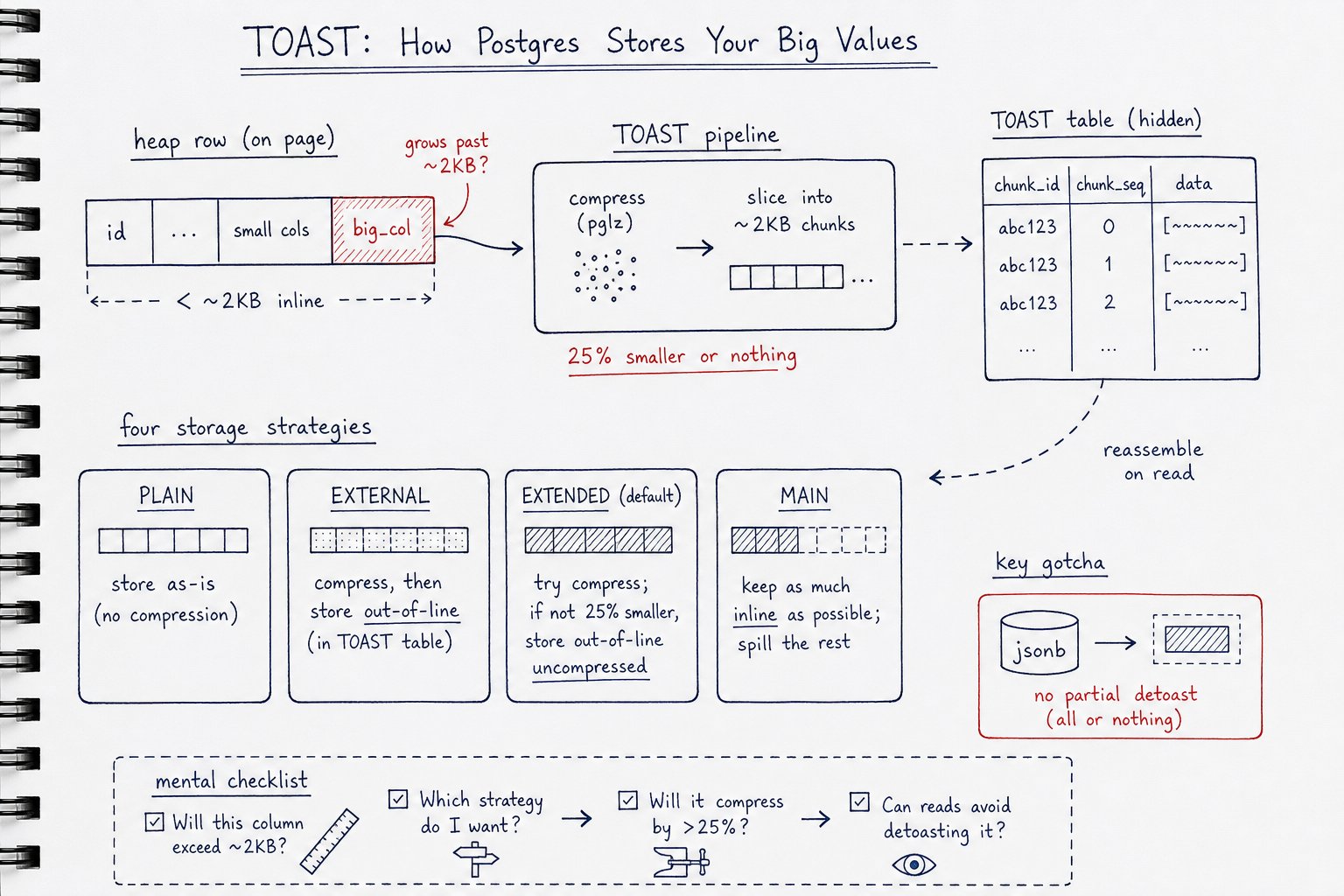
Most of the time TOAST just works and you never think about it. When it doesn't, the failures are quiet: undercounted table sizes, indexes that silently stop being used, autovacuum falling behind on a table that "isn't that big." Here's what to check before you trust your numbers or your dashboards.
Confirm the Storage Strategy Per Column
Every column has a storage mode — PLAIN, MAIN, EXTERNAL, or EXTENDED — and Postgres picks a default based on data type, not on what you actually intended. A jsonb column you meant to compress in-line might be sitting as EXTERNAL (out-of-line, uncompressed), or vice versa.
Check it with:
SELECT attname, attstorage FROM pg_attribute WHERE attrelid = 'your_table'::regclass;
Fix it with ALTER TABLE your_table ALTER COLUMN your_column SET STORAGE EXTENDED; (or EXTERNAL, MAIN, PLAIN). Do this before you measure anything — a mismatched storage strategy skews every size comparison downstream.
Measure Size on Real Data, Not Seed Data
Once storage strategy is confirmed, compare pg_column_size() against octet_length() — but do it on production-shaped rows, not tidy test data. Synthetic rows rarely trigger TOAST the way a genuinely wide, messy production row does, and the gap between these two functions only becomes meaningful once compression and out-of-line storage are actually in play.
Watch for Failed Compression
Run pg_column_compression(column) across a sample of rows and pay attention to NULLs. A NULL result doesn't mean "compression wasn't attempted" — it means compression was tried and failed the 25%-reduction rule, so that value is sitting uncompressed even though you assumed otherwise.
If you're on Postgres 14+, this is also where lz4 earns its keep. It compresses faster than the default pglz, which matters most on the wide jsonb columns most likely to blow past the compression threshold:
ALTER TABLE your_table ALTER COLUMN payload SET COMPRESSION lz4;
Find the TOAST Table Before You Need It
Confirm reltoastrelid exists for the table and write down the pg_toast relation's name somewhere your on-call team can actually find at 3 a.m.:
SELECT reltoastrelid::regclass FROM pg_class WHERE oid = 'your_table'::regclass;
It's a small thing until it's the only thing standing between you and a diagnosis.
Stop Rewriting Large JSONB in a Loop
Look at how the application writes to these columns. Does anything call jsonb_set() on a large document inside a loop? That pattern detoasts and rewrites the entire value on every iteration — one of the most common self-inflicted TOAST performance problems, and one that shows up as mysteriously slow updates on rows that "aren't even that big" by row-count standards.
Tune Autovacuum Separately for Churning TOAST Tables
If any TOASTed columns churn — written and rewritten frequently — tune toast.autovacuum_vacuum_scale_factor on that table specifically. The default scale factor assumes a size profile that doesn't hold once TOAST tables are involved, and dead tuples pile up faster than most people expect.
ALTER TABLE your_table SET (toast.autovacuum_vacuum_scale_factor = 0.05);
Monitor pg_table_size, Not pg_relation_size
For sizing, track pg_table_size(), not pg_relation_size(). The latter only reports the main relation fork and will systematically undercount tables with significant TOASTed data — sometimes by an order of magnitude.
Baseline TOAST I/O While Things Are Healthy
Pull toast_blks_read and toast_blks_hit from pg_statio_all_tables now, while the system is behaving. Without a baseline, there's no way to tell a real regression from normal noise once TOAST I/O starts climbing. If you're not already tracking this over time, a monitoring layer like MyDBA can capture it automatically so you're not building the dashboard mid-incident.
Know the B-Tree Index Limit
Check your B-tree indexes for any column that can exceed roughly 2704 bytes. Postgres will happily let you build the index, but it can't index a value past that threshold — and the failure mode isn't obvious until someone's query silently stops using an index they expected to be there.
Ask If the Column Belongs in the Table at All
Last question, and the one people skip because it's uncomfortable: does this wide column actually belong here? If the honest answer is no, move it out. A side table with a foreign key is often cheaper, in every sense, than carrying a column that forces every read through TOAST.
Most of TOAST is invisible and works fine. The parts that fail, fail slowly — and show up somewhere you weren't looking.