Partition Pruning Isn’t Magic — Here’s When It Actually Works
A few weeks ago I sat down with a team that had just “fixed” a slow dashboard by partitioning a 12‑million‑row orders table by month. One hundred partitions, clean range boundaries, no more full‑table scans. Then they showed me the week‑end report query, and the EXPLAIN plan that scanned every single child table. The partition key was right there in the WHERE clause, they’d used date_trunc, and Postgres didn’t remove a thing.
📖 Read the full guide: Why Your Partitioned Tables Are Still Slow: A Deep Dive into PostgreSQL Partitio
▶ Watch the video walkthrough: Partition Pruning: Making the Planner Skip 99% of Your Data
https://www.youtube.com/watch?v=7-UnHDvOtbY
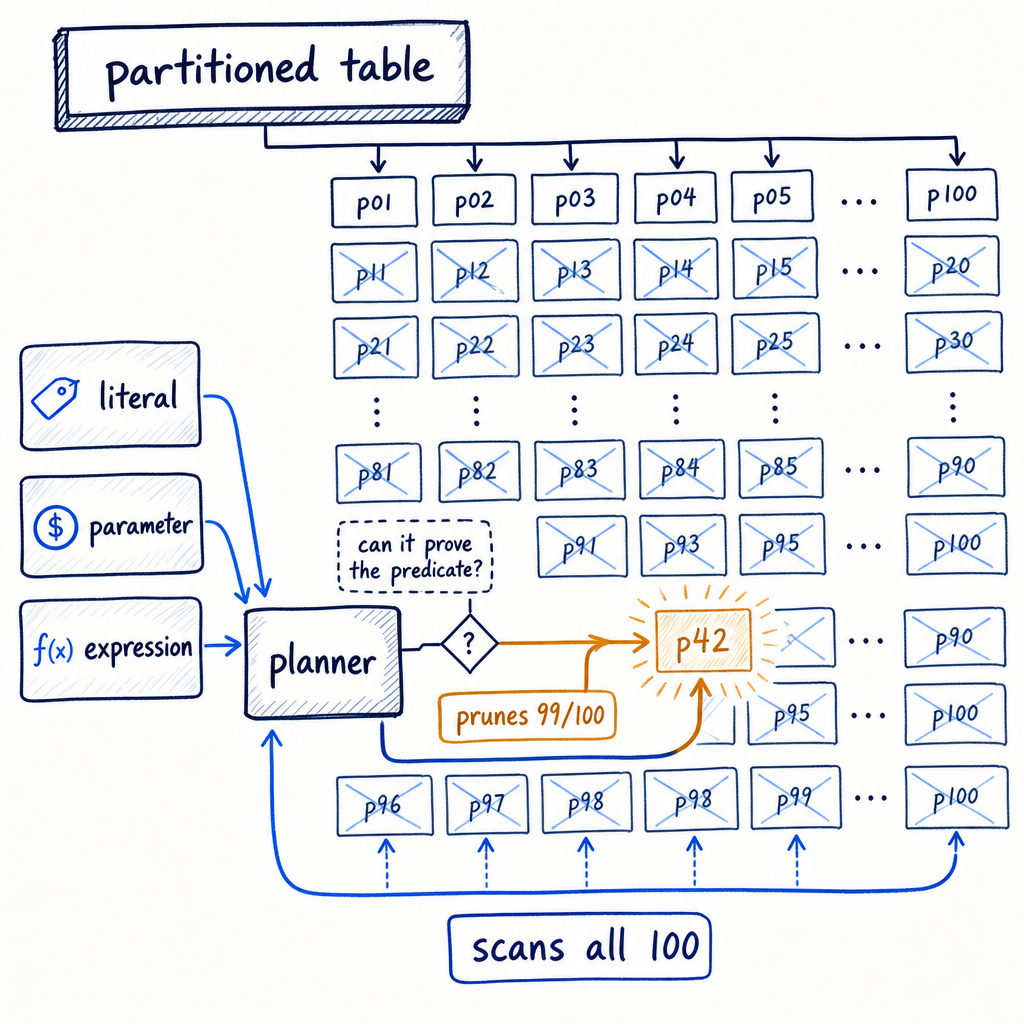
The companion video walks through that exact scenario, but here I want to go deeper: into the SQL patterns that silently kill pruning, the inner workings of planner‑time vs. execution‑time decisions, and the exact EXPLAIN commands you need to prove whether Postgres is using your partitions or just pretending to.
The setup: 100 partitions, one question nobody asks
You’ve got a monthly range‑partitioned table — something like this:
CREATE TABLE orders (
    order_id   bigint,
    order_date date NOT NULL,
    amount     numeric
) PARTITION BY RANGE (order_date);

CREATE TABLE orders_2024_01 PARTITION OF orders
    FOR VALUES FROM ('2024-01-01') TO ('2024-02-01');
-- ... 100 partitions ...
You run a query for the last week, with a constant date literal, and the plan shows only one partition. Good. But then someone wraps the column in a function, or a developer sends a prepared statement with a parameter, and the next EXPLAIN lists every partition. The trap is believing that “partitioned” equals “pruned.” It doesn’t. You need to verify.
Two flavours of pruning
Postgres prunes in two distinct moments:
-
Planner‑time pruning works when the
WHEREclause uses plain constants orSTABLEexpressions known at planning. The plan lists only the surviving partitions, and planning is sub‑millisecond.EXPLAIN SELECT * FROM orders WHERE order_date = '2024-03-15'; -- Append (cost=0.00..25.88 rows=6 width=52) -- -> Seq Scan on orders_2024_03 (cost=0.00..25.88 rows=6 width=52) -- Filter: (order_date = '2024-03-15'::date) -- Planning Time: 0.123 msNo mention of the other 99 children — they were removed before the executor ever started.
-
Execution‑time pruning kicks in when the value isn’t available until runtime: parameters from a prepared statement, a PL/pgSQL variable, or a subquery. The plan still shows all partitions (the Append node lists every one), but a
Subplans Removed: Nline inEXPLAIN ANALYZEtells you the executor pruned them on the fly.PREPARE q(date) AS SELECT * FROM orders WHERE order_date = $1; EXPLAIN ANALYZE EXECUTE q('2024-03-15'); -- Append (cost=0.00..103.50 rows=6 width=52) (actual time=0.050..0.051 rows=1 loops=1) -- Subplans Removed: 99 -- -> Seq Scan on orders_2024_03 (cost=0.00..25.88 rows=6 width=52) -- Filter: (order_date = '2024-03-15'::date)The number 99 tells the real story. No number? You’re scanning every partition.
WHERE clauses that trigger pruning
The planner is literal‑minded. It prunes when the condition exactly matches the partition bound logic:
- Equality on the key (
WHERE order_date = '2024-05-01') — works for range, list, and hash. - Range predicates on range partitions:
>=,<,BETWEENall let the planner eliminate chunks. - IN lists and
ANY(array)on list or hash partitions (hash requires equality, soIN (1,2,3)prunes;BETWEENon a hash key scans everything). IS NULLwhen a separate partition exists forNULLvalues.
Hash partitioning equality‑only limitation:
CREATE TABLE events (
    id int, payload text
) PARTITION BY HASH (id);
-- 4 partitions: events_0, events_1, events_2, events_3
WHERE id = 42 scans exactly one partition. WHERE id BETWEEN 1 AND 100 scans all four — range logic doesn’t apply to hash, and the planner gives up immediately.
WHERE clauses that quietly kill pruning
These are the patterns I see trip people up every week:
- Wrapping the key in a function:
date_trunc('month', order_date) = '2024-01-01',EXTRACT(year FROM order_date) = 2024, or even a harmless‑lookingorder_date::text LIKE '2024-01%'. Before:Subplans Removed: 0. After rewriting toorder_date >= '2024-01-01' AND order_date < '2024-02-01'the plan shows 99 removed. - Comparing to a column from another table without a pushable join:
WHERE order_date = (SELECT ref_date FROM some_table)may scan everything unless the subquery reduces to a stable constant. - Mismatched data types forcing an implicit cast (the partition key is
datebut the literal istimestamp without time zone— the planner can’t always see through the cast). - OR conditions spanning non‑key columns:
WHERE order_date = '2024-03-15' OR customer_id = 1234defeats pruning because the second branch can’t be excluded. NOT INor<>on range partitions: the planner cannot invert the range boundaries to prune.
Run the two EXPLAIN variants side by side and watch the Buffers count — when pruning fails, the buffer hit jumps by two orders of magnitude.
Prepared statements, PL/pgSQL, and the generic‑plan trap
Postgres caches plans for prepared statements and PL/pgSQL functions. After the fifth execution, it may switch from a custom plan (parameter‑specific) to a generic plan (plan once, reuse for all values). A generic plan must assume any parameter value, so it always falls back to execution‑time pruning — or, if the plan is so generic that the executor can’t prove anything, no pruning at all. The worst case is a generic plan that lists all partitions and never removes them.
PREPARE get_orders(date) AS SELECT * FROM orders WHERE order_date = $1;
-- execute 6 times with different dates:
EXECUTE get_orders('2024-01-15');
...
EXPLAIN ANALYZE EXECUTE get_orders('2024-03-15');
-- If a generic plan is chosen, you may see all partitions scanned,
-- and zero "Subplans Removed", even though you passed a single date.
Force custom plans when you know the parameter will always hit a single partition:
SET plan_cache_mode = force_custom_plan;
Now every execution gets its own plan, and planner‑time pruning returns.
Reading EXPLAIN like you mean it
Verification checklist for partitioned tables:
- Planner‑time proof:
EXPLAIN(noANALYZE) — only the partition(s) you expect should appear. No Append with 100 children. - Execution‑time proof:
EXPLAIN ANALYZE— under theAppendnode, look forSubplans Removed: N(or older PG versionsPartitions Removed: N). The number must be close to total partitions minus one. - Red flag: All N child scans listed with real row counts > 0. That means the executor touched every one.
BuffersinEXPLAIN (ANALYZE, BUFFERS)— if buffer reads match summing all partition sizes, pruning is absent.
Joins, aggregates, and partition‑wise interactions
Joins can either help or hurt. When enable_partition_wise_join = on (default off), the planner can join matching partitions directly, sometimes allowing pruning on both sides. But nested‑loop joins with a parameterized inner scan often ruin pruning entirely. Take this query:
SELECT * FROM orders o
JOIN batch_ids b ON o.order_date = b.ref_date;
-- batch_ids has 5 rows; planner chooses nested loop.
EXPLAIN ANALYZE will show a Nested Loop with the inner Append scanning all partitions per outer row. Even if each loop prunes at execution time, the overhead of re‑evaluating the partition list 5 times can be massive. Rewrite to use a hash join with a static list, or IN with literal values, to allow planner‑time pruning.
A production war story: the function that cost us 96 partition scans
We had a billing dashboard that took 30 seconds instead of 300 ms. The query used WHERE date_trunc('month', order_date) = '2024-01-01'. It looked like a harmless boundary condition, but date_trunc returns timestamp with time zone, not date, and even if it matched, it’s a non‑immutable expression the planner can’t evaluate against partition bounds. The plan showed 96 partitions scanned (4 years × 24 half‑months). An EXPLAIN ANALYZE, BUFFERS revealed the real damage — every partition touched, cache churn through the roof.
The fix was one line:
-- before: 96 partitions scanned
-- after: 1 partition scanned
WHERE order_date >= '2024-01-01' AND order_date < '2024-02-01'
Total planning time dropped, execution time went from 30s to 87ms. This is the difference between partitioned tables doing their job and them being dead weight.
Settings and guardrails
enable_partition_pruning— on by default since PostgreSQL 11. Leave it on. Turning it off is a debugging step, never a production setting.plan_cache_mode— defaults toauto, switches to generic after 5 executions. Considerforce_custom_planfor PL/pgSQL functions that always query a narrow date range.enable_partition_wise_join— off by default; turn on with caution and test thoroughly. It can massively reduce data shuffling, but may increase planning time.constraint_exclusionis the ancient mechanism for inheritance‑based partitioning. It’s not the same as native partition pruning and you should ignore it unless you’re still on pre‑v10 inheritance tables.
Monitor with pg_stat_statements: look for queries against partitioned tables whose mean execution time hasn’t dropped after partitioning, or whose shared_blks_read remains high. That’s your pruning failure alarm bell. When mean latency stays flat after partitioning, the partitions are just decorative.
Pruning works when you force it to prove itself
Partition pruning isn’t delivered by the DDL; it’s earned by every WHERE clause you write. Use EXPLAIN without ANALYZE to confirm the planner dropped partitions at compile time, and EXPLAIN ANALYZE to count Subplans Removed. Never wrap the partition key in a function, cast it implicitly, or hide it inside an OR branch. For prepared statements, check the plan cache mode and revert to custom plans when the generic plan betrays you. And treat buffer counts like a polygraph — if shared_blks_read matches the whole table, pruning isn’t happening.
Partitioned tables are a multiplier, not a magic wand. They amplify good access patterns and punish bad ones equally. Make the planner work for you by feeding it crisp, direct predicates, and it will reply with lightning‑fast index‑or‑sequential scans on exactly one child. Skip the discipline, and you’ll end up with 100 partitions that just convert one full scan into a hundred tiny ones, burning CPU and cache with no benefit. The dashboard that started this story now runs in 87 milliseconds, and the only difference is that nobody wraps order_date in a function anymore. That’s the whole secret.