pg_cancel_backend vs pg_terminate_backend: a DBA's runbook
It was 02:14 on a Tuesday. A migration job fired an UPDATE against a 40M-row orders table without a WHERE clause narrow enough to matter, took an exclusive row lock on half of it, and the checkout path started queueing behind it. PagerDuty went off at the twelve-minute mark. Connection count climbed from 90 to 340 because every blocked request held its pooled connection open.
📖 Read the full guide: pg_cancel_backend vs pg_terminate_backend Explained
The decision at that moment is binary, and you should already know the answer before you open psql:
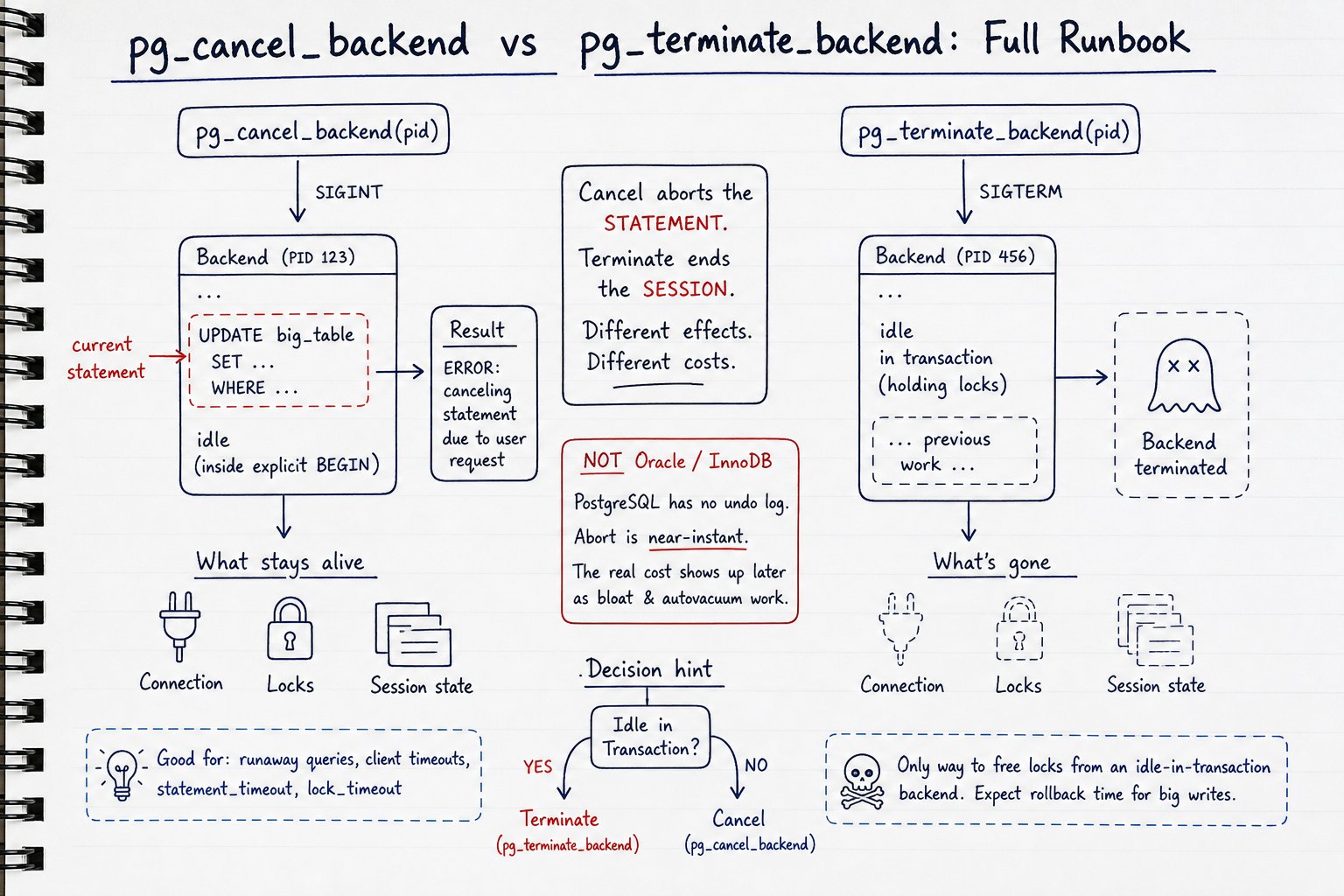
Cancel the statement. Terminate the session.
pg_cancel_backend stops the query and leaves the connection alive. pg_terminate_backend kills the whole session. If the problem is a running query, cancel first. If the problem is a session that isn't running anything but won't let go of its locks, cancel does nothing for you and terminate is the only lever.
I walked through the mental model in a short video (pg_cancel_backend vs pg_terminate_backend on YouTube). This piece is the runbook version: the SQL, the permission model, and the edge cases that don't fit in five minutes.
What each function actually does
The signatures:
pg_cancel_backend(pid integer) → boolean
pg_terminate_backend(pid integer, timeout bigint DEFAULT 0) → boolean
pg_cancel_backend sends SIGINT to the target backend. The backend notices at the next CHECK_FOR_INTERRUPTS() point, aborts the current statement, and goes back to waiting for the next command on the same connection.
pg_terminate_backend sends SIGTERM. The backend aborts its current transaction, runs full cleanup, and exits. The client's socket closes.
That second timeout argument arrived in PostgreSQL 14. It's a wait in milliseconds. If you pass a value greater than zero, the function blocks up to that long waiting for the backend to actually disappear, and returns false with a warning if it's still there. Without it, you get an immediate answer that tells you nothing about outcome.
Which brings me to the single most misread part of these functions: true means the signal was sent, not that the query stopped. I've watched people run pg_cancel_backend, see t, and declare victory while the query keeps burning CPU in pg_stat_activity. That's normal and expected. The backend has to reach a safe interrupt point before anything happens. Always verify:
SELECT pid, state, wait_event_type, wait_event,
       now() - query_start AS running_for,
       left(query, 60) AS q
FROM pg_stat_activity
WHERE pid = 918273;
The client-side errors are how you tell which one landed:
| Event | Client sees | SQLSTATE |
|---|---|---|
pg_cancel_backend |
ERROR: canceling statement due to user request |
57014 |
statement_timeout fired |
ERROR: canceling statement due to statement timeout |
57014 |
pg_terminate_backend |
FATAL: terminating connection due to administrator command |
57P01 |
Note that a cancel and a statement_timeout share SQLSTATE 57014. Your application retry logic cannot distinguish "the DBA killed me" from "I ran too long" by error code alone, only by message text. Plan accordingly.
Permissions. By default you need one of three things: superuser, membership in the predefined role pg_signal_backend, or ownership of the target backend (same role). Members of pg_signal_backend cannot signal backends owned by superusers. This bites during incidents when your on-call role has pg_signal_backend but the runaway query was launched by a superuser-owned cron job. Grant it ahead of time:
GRANT pg_signal_backend TO oncall_dba;
Decision table: which one, when
| Situation | Send | What actually happens | What it does NOT fix |
|---|---|---|---|
Runaway SELECT / reporting query |
pg_cancel_backend |
Statement aborts at next interrupt check, session survives, pooled connection returns clean | Won't stop the app from re-running it |
Long UPDATE / DELETE in autocommit |
pg_cancel_backend |
Abort is near-instant, locks released | Dead tuples already written stay as bloat until vacuum |
Same statement inside explicit BEGIN |
Cancel, then expect to terminate | Statement aborts; session goes to idle in transaction (aborted) still holding every lock |
Locks are NOT released by the cancel |
idle in transaction holding locks |
pg_terminate_backend |
Session exits, transaction aborts, locks released | Cancel does literally nothing here |
idle in transaction (aborted) |
pg_terminate_backend (or client ROLLBACK) |
Same as above | Cancel does nothing |
| Autovacuum worker | Usually leave it; terminate if truly necessary | Launcher starts a replacement shortly after | Doesn't fix the underlying bloat that triggered it |
| Anti-wraparound autovacuum | Leave it alone | Repeated kills push you toward the wraparound protection limit and a cluster that refuses writes | Nothing about this ends well |
CREATE INDEX CONCURRENTLY |
Either signal | Leaves an invalid index behind (pg_index.indisvalid = false) |
You must drop and rebuild manually |
VACUUM FULL / CLUSTER |
pg_cancel_backend |
Abort unlinks the new relation files it built | Original table is untouched; no data loss, but the rewrite work is thrown away |
| Session behind PgBouncer | Terminate the server-side PID | Backend dies; PgBouncer's client may reconnect and replay | Doesn't stop the app from immediately retrying |
| Prepared (2PC) transaction | Neither | Terminating the backend does not release its locks | Needs ROLLBACK PREPARED; check pg_prepared_xacts |
Finding the right PID (and not killing the wrong thing)
Do not signal the first long-running query you see. In a blocking chain, the query you notice is usually the victim, not the cause.
Longest-running active statements, client backends only, excluding yourself:
SELECT pid,
       usename,
       application_name,
       state,
       now() - xact_start  AS xact_age,
       now() - query_start AS query_age,
       wait_event_type, wait_event,
       left(query, 80) AS query
FROM pg_stat_activity
WHERE backend_type = 'client backend'
  AND state <> 'idle'
  AND pid <> pg_backend_pid()
ORDER BY query_start
LIMIT 20;
The backend_type = 'client backend' filter matters. Without it you will eventually hand a PID to pg_terminate_backend that belongs to an autovacuum worker or a walsender, and you'll have created a second incident.
Idle in transaction, ranked by how long the transaction has been open:
SELECT pid, usename, application_name, state,
       now() - xact_start AS xact_age,
       now() - state_change AS idle_for,
       left(query, 80) AS last_query
FROM pg_stat_activity
WHERE backend_type = 'client backend'
  AND state IN ('idle in transaction', 'idle in transaction (aborted)')
ORDER BY xact_start
LIMIT 20;
last_query here is the last statement the session ran, not something currently executing. That trips people up. A session showing a nasty UPDATE in idle in transaction state finished that update minutes ago and is now sitting there holding its locks while the app does something else.
And the one that actually matters during a pileup, the head of the blocking chain:
SELECT blocked.pid           AS blocked_pid,
       blocked.wait_event,
       now() - blocked.query_start AS blocked_for,
       blocker.pid           AS blocker_pid,
       blocker.state         AS blocker_state,
       now() - blocker.xact_start AS blocker_xact_age,
       left(blocker.query, 60) AS blocker_query
FROM pg_stat_activity blocked
JOIN LATERAL unnest(pg_blocking_pids(blocked.pid)) AS b(pid) ON true
JOIN pg_stat_activity blocker ON blocker.pid = b.pid
WHERE cardinality(pg_blocking_pids(blocked.pid)) > 0
ORDER BY blocked_for DESC;
Run that and look for the PID that appears as a blocker but never as a blocked. That's your target. On the 2 a.m. incident above, 47 sessions were blocked, 46 of them were blocked by each other, and exactly one, the migration job, was blocking without being blocked.
The rollback myth: PostgreSQL has no undo log
Here's the belief that costs the most time during an incident: "we're twelve minutes into this UPDATE, if I cancel it now the rollback will take another twelve minutes, so we might as well let it finish."
That is true in Oracle. It's true in InnoDB. It is not true in PostgreSQL.
Oracle and InnoDB implement MVCC with undo segments. Old row versions live in undo, and rollback means walking those undo records and applying them in reverse. A rollback there genuinely can take as long as the original operation, sometimes longer, because the undo apply is often less efficient than the forward work was.
PostgreSQL keeps old row versions in the table itself. There is no undo log to replay. Aborting a transaction does not physically reverse anything it wrote. Abort processing marks the transaction ID as aborted in the commit log (pg_xact), releases locks and buffer pins, and stops. Rows the transaction inserted, and old versions it superseded, are simply left behind as dead tuples. Any future reader consults pg_xact, sees the XID is aborted, and ignores them. VACUUM reclaims the space later.
So cancelling a 40M-row UPDATE at minute twelve is near-instant regardless of how many rows it touched. On the incident I opened with, the cancel took under two seconds to take effect and the checkout path recovered in under ten.
Two honest caveats.
Abort is not entirely free for statements that created relation files. CREATE TABLE AS, CREATE INDEX, VACUUM FULL, CLUSTER. Abort has to unlink the files those statements built. On a 900 GB table rewrite that unlink is real filesystem work, though it's still orders of magnitude cheaper than an undo replay.
The real bill is deferred, not avoided. The WAL for those 40M row versions is already written and already shipped to your replicas. The heap and every index on it have already grown. Those dead tuples must be cleaned up by autovacuum before the space is reusable. I've seen a cancelled bulk update double a table's on-disk size and keep autovacuum busy for forty minutes afterward. Cancel is cheap. The consequences of the write that already happened are not. The incident isn't over when the query stops. It's over when the bloat is cleaned up.
So why did my cancel appear to do nothing?
Ranked by how often I actually see it:
1. The statement ran inside an explicit BEGIN. This is the big one. Cancelling a statement inside a transaction block does not end the transaction. The session moves to idle in transaction (aborted) and continues to hold every lock it acquired until the client sends ROLLBACK or you terminate the session. You watch the query disappear from pg_stat_activity, congratulate yourself, and the blocking chain doesn't move. Check the state column, not the query column:
SELECT pid, state, now() - xact_start AS xact_age
FROM pg_stat_activity WHERE pid = 918273;
If it says idle in transaction (aborted), cancel is done helping you. Terminate.
2. The backend is in an uninterruptible system call. Blocking disk I/O, an fsync on a saturated volume, a process in D state. Interrupts are checked at safe points in the executor and utility code, and a syscall the kernel won't return from isn't one. You'll see wait_event_type = 'IO' in pg_stat_activity. Wait for the I/O to complete; the cancel is already queued and fires the moment it does.
3. It's waiting on a remote peer. postgres_fdw, dblink, or an unresponsive client mid-COPY. Look for wait_event_type = 'Client' or 'IPC'. The backend is stuck outside PostgreSQL's own loops.
4. It's inside a C function or extension whose loop omits CHECK_FOR_INTERRUPTS(). Rare, but it happens with badly written extensions and some PL glue. Nothing you can do from SQL.
5. The app reconnected and re-ran the same query. You killed PID 918273 and now PID 918891 is running the same statement with the same start-time-since-restart. Check the PID, not the query text. This is the single most common reason a cancel "didn't work."
Now the correction. There's a widespread belief that a backend blocked on a heavyweight lock cannot be cancelled. That's carried over from other systems. In PostgreSQL, heavyweight lock waits are interruptible, because the lock manager's sleep loop is itself built on the same interrupt-check mechanism as everything else. A backend sitting in wait_event_type = 'Lock' will respond to a cancel. If it isn't responding, you're in one of the five cases above, not in a lock wait.
One special case worth knowing: a backend waiting inside synchronous replication for standby acknowledgement responds to a cancel by stopping the wait and emitting a warning that the transaction has already committed locally but may not have been replicated. The commit is not cancelled. You've only stopped waiting to hear about it.
Terminate: what it fixes, what it hides, and what it breaks
Terminate is the only lever for idle in transaction. There is no statement to cancel, so pg_cancel_backend returns true and accomplishes nothing while the locks stay held.
A thing people get wrong: terminate does not let the backend skip cleanup. The process still runs abort processing, releases locks, removes temp files, and exits. What changes is that the session vanishes from pg_stat_activity while that cleanup is happening. So if you terminate a session that was mid-VACUUM FULL on a huge table, the backend is still unlinking files somewhere you can no longer observe it. That's why the PG14+ timeout argument is useful:
SELECT pg_terminate_backend(918273, 5000); -- wait up to 5s for it to actually exit
The collateral damage list:
- The client gets
FATAL: terminating connection due to administrator command(57P01). Most drivers surface this as a connection error, not a query error, which means your app's query-level retry logic may not catch it. - Connection poolers and ORMs may reconnect and replay the same statement immediately. I've watched a terminate turn into a retry storm that was worse than the original problem. Terminate and then watch
pg_stat_activityfor the same query text reappearing. - Everything session-scoped disappears: temp tables, prepared statements, session-level advisory locks,
SETvalues. - A prepared (two-phase-commit) transaction survives termination. Its locks are held by a dummy PGPROC entry. Killing the backend does not touch it. Check
pg_prepared_xactsand resolve withROLLBACK PREPARED 'gid'.
Never reach for kill -9
From the shell, kill -INT <pid> is equivalent to pg_cancel_backend and kill -TERM <pid> is equivalent to pg_terminate_backend. Those are fine.
kill -9 is not. When a backend dies without cleaning up, the postmaster has to assume shared memory may be corrupt. It terminates every other backend in the cluster and forces a crash recovery cycle. You go from one stuck query to a full outage plus however long recovery takes. Your log will show something like server process (PID 918273) was terminated by signal 9: Killed, then terminating any other active server processes, then database system was not properly shut down; automatic recovery in progress.
There is no situation where kill -9 on a backend is the right call.
The escalation runbook
Sixty seconds, in order.
- 0:00 — Identify the head of the chain. Run the
pg_blocking_pids()query above. Find the PID that blocks but isn't blocked. - 0:15 — Cancel it.
SELECT pg_cancel_backend(918273); - 0:20 — Wait and watch. Poll
pg_stat_activityevery few seconds. Watchstateandwait_event, not the return value. - 0:35 — Check the state. If the session is now
idle in transaction (aborted), the cancel worked and the locks are still held. Go to step 5. If the query is still running, checkwait_event_typeagainst the five causes above. - 0:40 — Terminate.
SELECT pg_terminate_backend(918273, 5000); - 0:50 — Verify. Confirm the PID is gone from
pg_stat_activityand thatpg_locksno longer shows its entries. Confirm the blocked sessions are draining. - Post-incident. Check for invalid indexes, check bloat on the affected table, and confirm autovacuum has queued a pass.
Invalid index check, which you should run after every cancelled CREATE INDEX CONCURRENTLY:
SELECT n.nspname, c.relname AS index_name, pg_size_pretty(pg_relation_size(c.oid))
FROM pg_index i
JOIN pg_class c ON c.oid = i.indexrelid
JOIN pg_namespace n ON n.oid = c.relnamespace
WHERE NOT i.indisvalid;
An invalid index won't be used for queries but still consumes space and still gets maintained on every write. Drop it and rebuild.
If you need to kill a whole class of query, always dry-run the SELECT first:
-- DRY RUN
SELECT pid, now() - query_start AS age, left(query, 60)
FROM pg_stat_activity
WHERE backend_type = 'client backend'
  AND state = 'active'
  AND application_name = 'nightly_report'
  AND now() - query_start > interval '10 minutes'
  AND pid <> pg_backend_pid();

-- then swap SELECT pid for SELECT pg_cancel_backend(pid)
Preventing the whole situation: timeouts that do the killing for you
Every incident above is a timeout you didn't set.
statement_timeout defaults to 0 (disabled). When set, a statement running longer than the limit is aborted with a cancel-equivalent error. Values without units are milliseconds. It's per statement, which is its main limitation.
lock_timeout aborts a statement that has waited longer than the limit to acquire a lock. Set independently of statement_timeout. This is the standard safety net for DDL: without it, an ALTER TABLE that queues behind a long transaction blocks everything arriving after it.
idle_in_transaction_session_timeout (default 0) terminates sessions idle inside a transaction beyond the limit. This is the setting that would have saved you the 2 a.m. page.
transaction_timeout, added in PostgreSQL 17, terminates a session whose transaction exceeds the limit regardless of statement boundaries. It closes the gap statement_timeout leaves: a transaction made of ten thousand fast statements never trips statement_timeout and can stay open for hours.
Set them per role, not globally:
-- OLTP application role
ALTER ROLE app_user SET statement_timeout = '15s';
ALTER ROLE app_user SET lock_timeout = '3s';
ALTER ROLE app_user SET idle_in_transaction_session_timeout = '60s';

-- Reporting / analytics
ALTER ROLE reporting SET statement_timeout = '10min';
ALTER ROLE reporting SET idle_in_transaction_session_timeout = '5min';

-- Migrations
ALTER ROLE migrator SET lock_timeout = '5s';
ALTER ROLE migrator SET statement_timeout = '30min';

-- Per-database default
ALTER DATABASE analytics SET statement_timeout = '10min';
Per transaction, for the one DDL you're about to run by hand:
BEGIN;
SET LOCAL lock_timeout = '2s';
SET LOCAL statement_timeout = '30s';
ALTER TABLE orders ADD COLUMN fulfilled_at timestamptz;
COMMIT;
Do not set statement_timeout in postgresql.conf. The documentation advises against it and the reason is practical: it applies to every session including pg_dump, logical replication initial syncs, index builds, and your own maintenance scripts. I've seen a global 30-second statement_timeout silently break nightly backups for two weeks. Leave superuser and maintenance roles at 0 deliberately.
What I actually set on a new cluster
-- application role
ALTER ROLE app     SET statement_timeout = '15s';
ALTER ROLE app     SET lock_timeout = '3s';
ALTER ROLE app     SET idle_in_transaction_session_timeout = '60s';
ALTER ROLE app     SET transaction_timeout = '120s';   -- PG17+

-- reporting role
ALTER ROLE report  SET statement_timeout = '10min';
ALTER ROLE report  SET idle_in_transaction_session_timeout = '5min';

-- migration role
ALTER ROLE migrate SET lock_timeout = '5s';
ALTER ROLE migrate SET statement_timeout = '30min';

-- maintenance / superuser: left at 0, on purpose

GRANT pg_signal_backend TO oncall_dba;
The trade-off is real and you should say it out loud to your application team before you turn any of this on: aggressive timeouts convert "slow" into "failed". A query that used to take 40 seconds and annoy someone now throws SQLSTATE 57014 and surfaces as an error. That's the right outcome, but only if the application has retry logic with backoff for 57014 and 57P01, and only if those errors go somewhere a human looks. A timeout without an alert is a silent gag on your own diagnostics.
The part I'd automate if I were doing this again is the detection, not the killing. Working out the head of a blocking chain by hand at 2 a.m. is exactly when you make PID mistakes. Tools like MyDBA will surface the chain and hand you the signal command already filled in, along with timeout suggestions based on what your workload actually does, which is a decent way to shorten the gap between "PagerDuty fired" and "I know which PID to hit."
Cancel the statement. Terminate the session. Check state before you believe either worked. And set the timeouts so you stop having to make the call at all.